Alight Solutions

End-to-end design for Annual Enrollment

Overview

Background

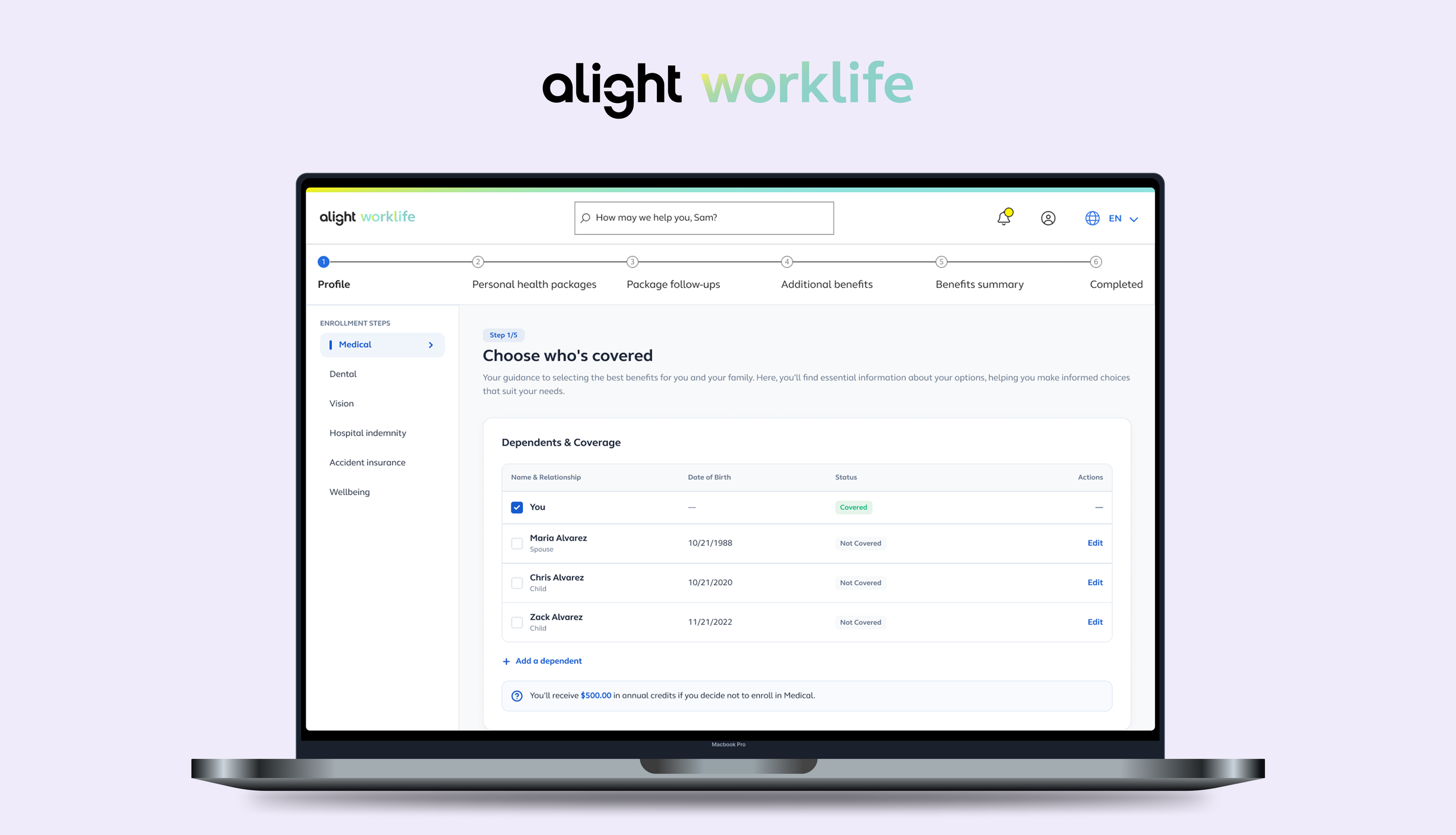
Alight Solutions is a HR and benefits enrollment platform that has been serving millions of users. Annual Enrollment is the flagship experience of Alight when millions of users log in each year to select and update their benefits.

Timeline

Sept 25 - Dec 25

Team

Designer (Me), Researcher, PM, Development Lead, + a lot of decision makers

Tools

Figma, Figma Make, Miro, Co-pilot

Solution

I was responsible for designing the new Enrollment Questions flow from the ground up, establishing its purpose, structure, and interaction patterns within the broader Annual Enrollment journey. This step guides users through key questions that inform their personalized benefit recommendations.

I streamlined the flow, introduced clearer navigation, and improved the overall usability so users always knew where they were and what to expect next.

Problem

As part of Alight’s modernization initiative, our team set out to redesign the outdated Annual Enrollment experience. The current flow felt lengthy, confusing, and offered little guidance with lots of content. We also added a new feature, Enrollment Question, which navigates users through series of question to generate personalized benefit bundles.

Action Plan

To ensure the design process stayed collaborative, user-centered, and aligned with business goals, I followed a structured and iterative plan:

1. Alignment with Stakeholders

I kicked off the project by facilitating a workshop to define our goals, requirements, and constraints.

Together, we mapped what we already understood about the existing enrollment experience and surfaced key gaps. And then got into sketching some ideas. We then select which concepts feel the strongest and I turned them into lo-fidelity sketches for better visualization.

Throughout the project, I ran twice-weekly design reviews with stakeholders, PMs, and product owners to align on priorities, share progress, and resolve challenges . This kept the team moving in sync and ensured decisions were made collaboratively and transparently

Then we reviewed those designs, discussed what might and might not work, and voted again on what we wanted to go forward with.

2. Ideate Multiple Design Directions and Edge Cases

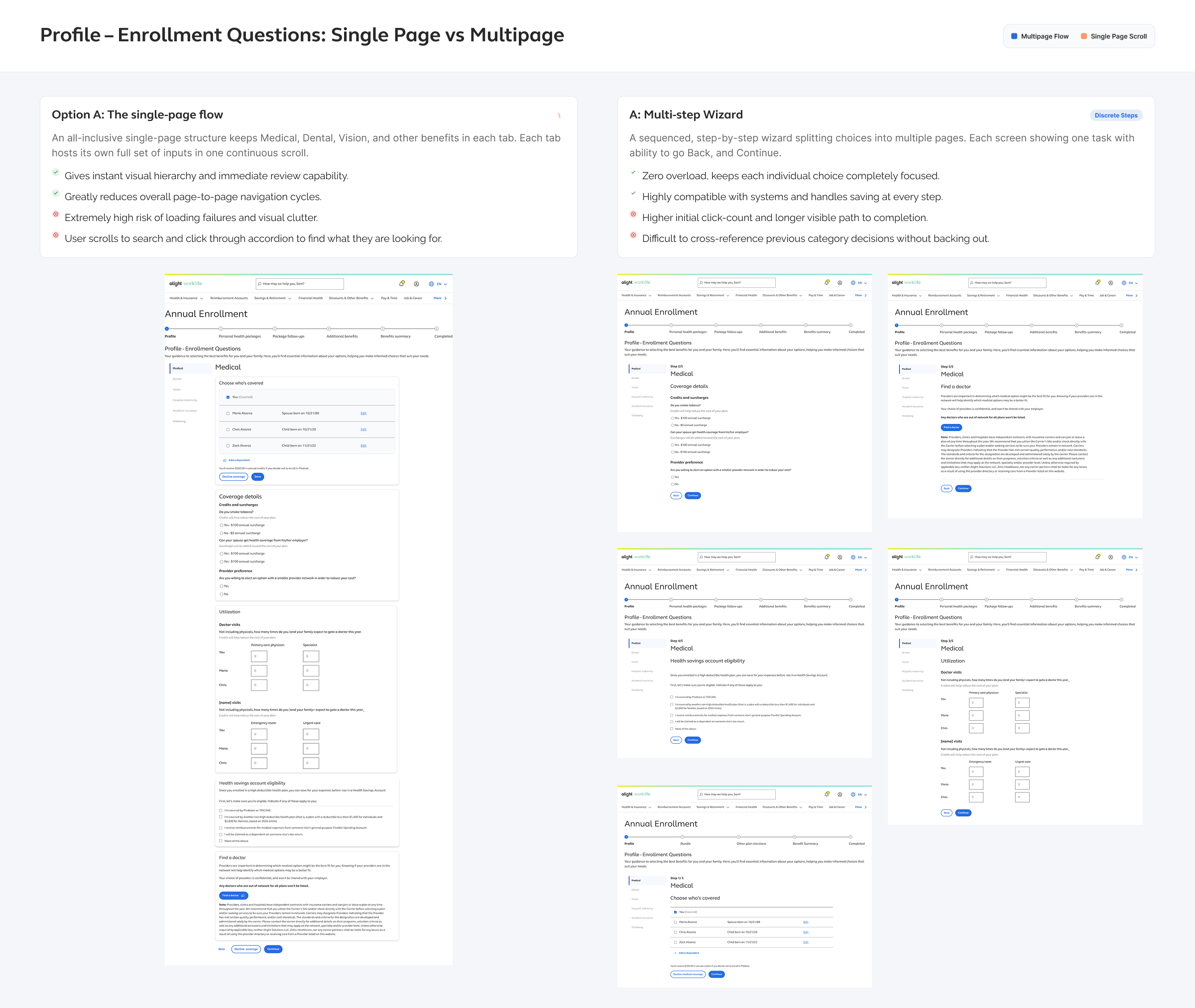
Moving forward with the strongest concepts, I created 2 prototypes for user testing.

Single page

The single-page concept displays all relevant questions on one screen based on whether they apply to Medical, Dental, or Vision. By combining multiple pages into one, it reduces overall steps and page turns in the Annual Enrollment flow, even though users still answer the same number of questions.

Multi-page

The multi-page concept guides users through each question step by step, resulting in multiple screens within the Medical, Dental, and Vision tabs. This approach reduces cognitive load and resolves issues where certain questions depend on previous answers.

Exploring adaptability

During this phase, I also explored how the experience would adapt across different use cases including integrating with AI chatbot and responsive across devices.

3. Test the concepts

I partnered with the User Research team to run unmoderated testing on two early concepts. Users were guided through several scenarios to validate usability, surface pain points, and identify opportunities for improvement.

Interpreting User Feedback

What the test shows

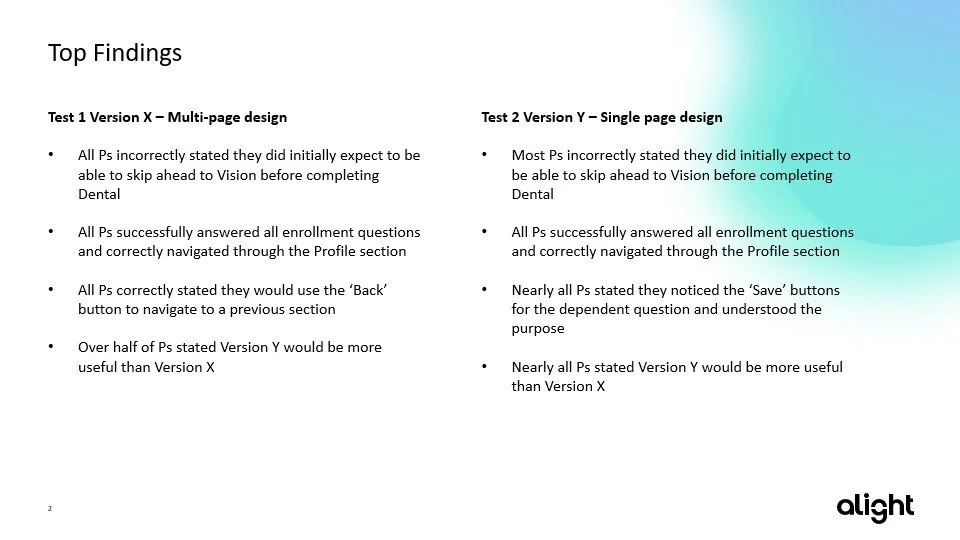
Both concepts were tested successfully which the team noted was a rare event. Participants completed tasks with little confusion in both prototypes. The test confirmed that the navigation system (left rail + stepper) worked as intended.

Discussing test results

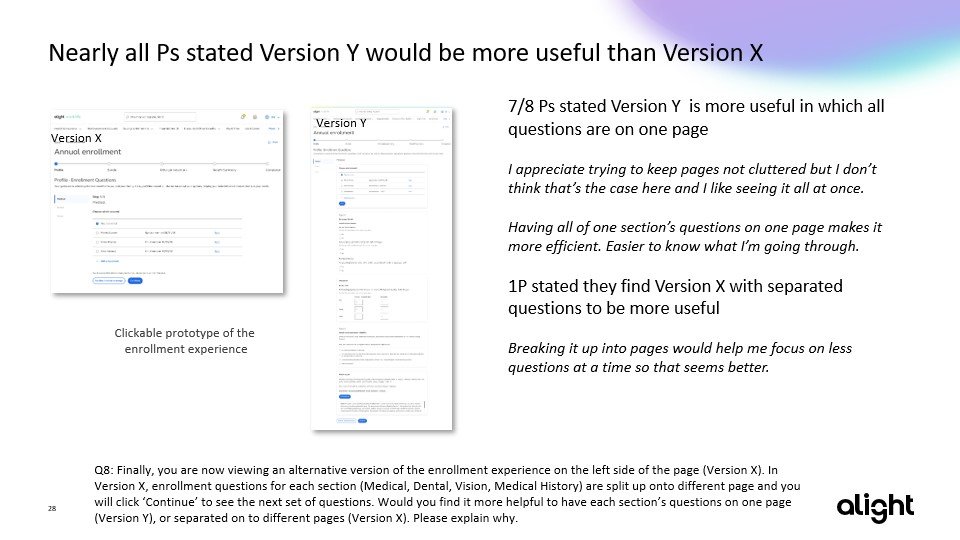
During testing, participants expressed a preference for the single-page version of the Enrollment Questions flow. This quickly became a focus point for PMs, who leaned toward the one-page layout based on that feedback.

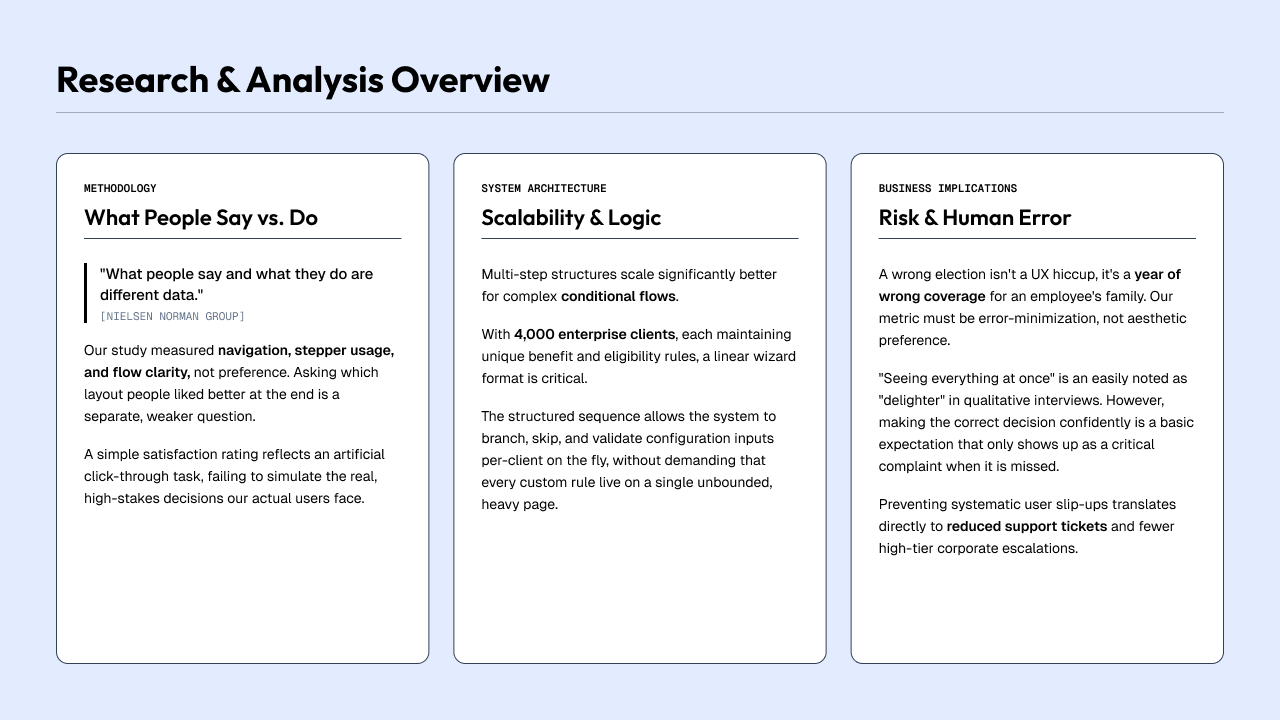
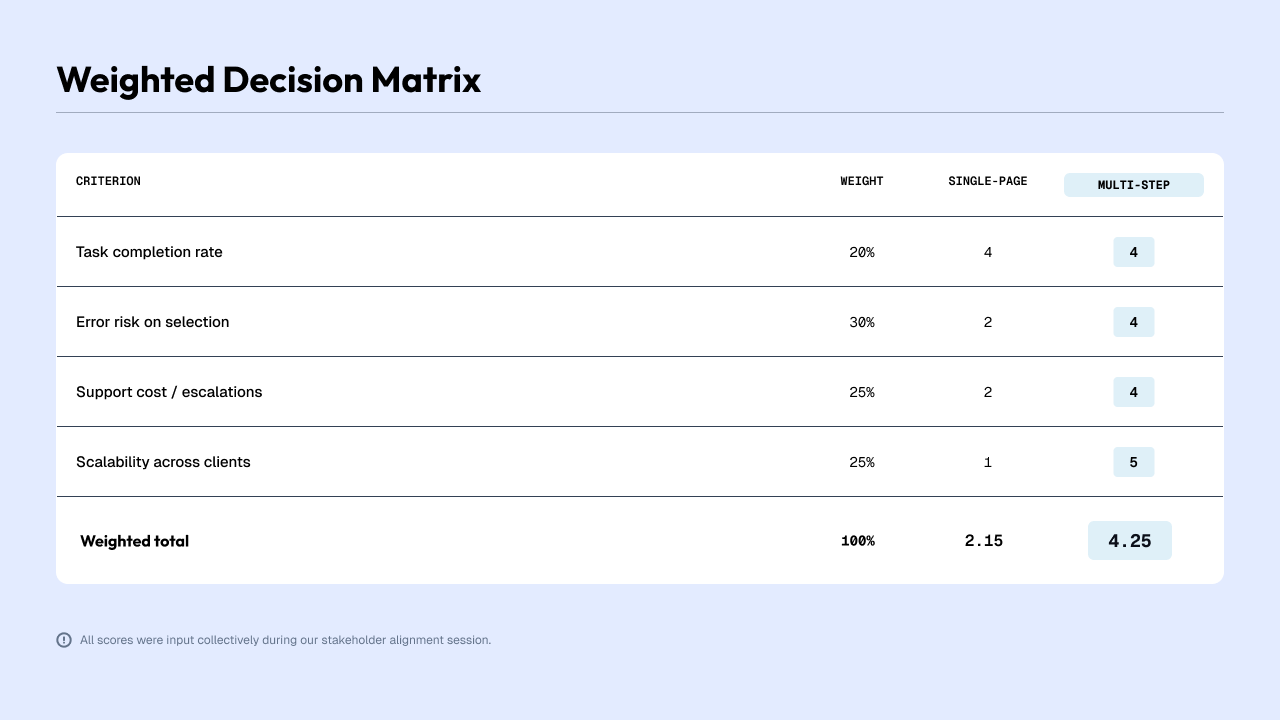
However, preference alone didn’t represent the full picture. I led a deeper discussion with stakeholders to ensure our decision was focused in user needs, context, and real-world behavior, not just by asking users simply what they like better. I stated:

1) The goal was to validate functionality, flow, and navigation, not to run a desirability test.

2) Users interacted with simplified prototypes using “fake” data where they simply just clicked through.

There are concerns of cognitive overload if we went with one-page layout, considering there would be longer text, complex and personal questions that users may need time to work through. A single-page layout could overwhelm users in real enrollment scenarios, even if they “liked” it during a low-pressure prototype test.

With those agreement, we made a decision to move forward with one-page layout. After all, it’s the responsibility of the design and product teams to interpret insights and select the direction that will scale for real behaviors and constraints.

3. Re-align, test again, reiterate

The team then was then tasked with creating a new Summary Page from leadership. This calls for re-alignment, more concepts and testing. So we pivot, under a tight deadline.

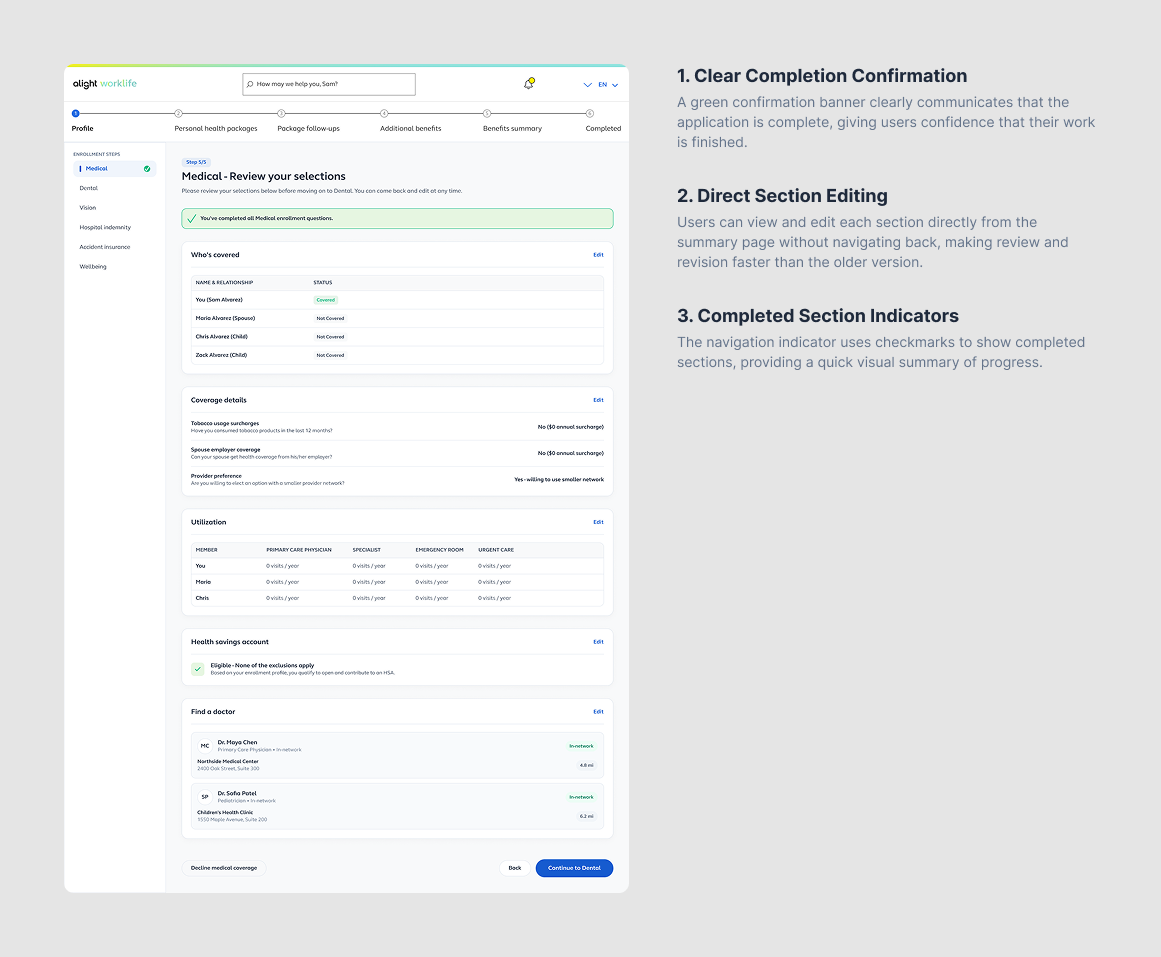
Summary page entails returning users could review and edit their previous year’s answers all from the page.

I began exploring concepts but quickly realized the solution wasn’t fitting holistically within the larger flow. Several concerns surfaced with the Summary Page approach:

  • Users may skim through the page and miss areas that require updates.

  • Editing a single answer could create confusing navigation, reintroducing pages out of context.

  • It risked scope creep, requiring additional components, design time, and engineering effort.

Summary page

This led me to step back and ask…

Why do we need a summary page?

To help users avoid re-answering the same information every year.

So I proposed an alternative solution which is the answers pre-filling from the previous year directly within the flow.


This approach required no new pages, reduced complexity, and kept users within the intended AE experience. It also aligned with business goals, encouraging users to thoughtfully review each question to ensure accurate, personalized benefit recommendations.

Pre-filled

Second round of research

To avoid bias, I pursued a couple directions and prepared them for testing.

We conducted a second round of research to evaluate user perception of the two concepts, focusing on comprehension, clarity of the elements, and where they may find confusing.

Key findings:

  • Users consistently felt that the Summary Page presented too much information at once and was overwhelming to read.

  • Participants responded positively to the pre-filled answers banner, noting that it clearly communicated what had been carried over from the previous year.

Decision

  • While we believe a Summary Page would be beneficial and would be a great oppoturnity to integrate with the rest of the platform, due to time and resource constraints (hand-off was less than a month away), we decided it won’t be enough time to deliver a well thoughtful design, and we should continue exploring this concept while prusring the develop a concept that tested well and aligns with development timeline.

Deliverable

Navigation and revision flexibility

Designing for Multiple Client Configurations

Problem

Because the product serves thousands of employers, each with different benefits avalibiltiies and question formats, there was no single standardized structure for enrollment questions. We needed a scalable system that could accommodate variations in question types.

Solution

I developed a flexible framework that supports all potential configurations. This included creating standardized UI patterns, placeholder variations, and reusable components packaged for development. The result was a scalable approach that improved design and development efficiency, and ensured coverage for every client scenario.

Problem

Users often have healthcare utilization needs that don’t neatly fit into predefined categories, or they may anticipate changes in the upcoming year. The existing flow didn’t support unique situations.

Solution

I designed a new pattern that allows users to specify expected changes for the upcoming year and choose custom answers per dependent. This vertical, easy-to-scan format gives users a clearer visual understanding of their household’s utilization and ensures more accurate plan recommendations.

Custom healthcare needs

Problem

Users needed a clear way to navigate through the enrollment flow and make updates to previous selections. How might we avoid users risk of making inaccurate choices or feeling stuck.

Solution

I introduced persistent navigation controls, allowing users to move backward using a “Back” action or directly through the vertical tabs. To For dependents decisions, I added a “Covering: [Names]” indicator, giving users instant visibility into who is included in each selection and the ability to adjust dependents at any point. This improved clarity, flexibility, and confidence throughout the flow.

Conclusion

Designing for annual enrollment meant balancing business priorities, technical constraints, and the needs of thousands of users across diverse clients. I partnered closely with cross-functional teams to create a flexible, scalable experience that helps users move confidently through complex decisions by simplifying navigation, question patterns, and edge cases.

A key part of this work was advocating for design-led decisions. I pushed for a multipage flow to better support clarity and user expectations, and recommended giving design time to thoughtfully solve the profile summary rather than rushing it. These choices streamlined the experience and kept the team focused on what mattered most.

Key Takeaways

  • Comprehensive user research is essential. Asking objective questions, without leading users to kept the insights accurate and actionable.

  • Bias is everywhere. Acknowledging it made it easier to refocus conversations on user goals and product outcomes.

  • Strong collaboration matters. Having a team that could question, challenge, and align ultimately led to a more scalable solution.

  • Design leadership means advocating early. Pushing for the multipage flow and deprioritizing the profile summary ensured we were building toward clarity, not complexity.

Next
Next

Optimizing search from minutes to seconds